Security License Lens
The security you already own (and ignore).
You pay for E5, Entra ID P2, Defender, and related SKUs. A lot of the useful controls in those SKUs never get turned on. LicenseLens maps what you own to the controls that should be on, then reports the gaps: you pay for X, we expected Y, we observed Z.
CLI: licenselens · Requires Python 3.12+
Documentation: d4rk-pri0r.github.io/licenselens
Sample report (dry-run): examples/sample-report/ — a scrubbed dry-run tenant.
Quick start
# One-command offline demo → HTML report (macOS / Linux / Windows)
pipx install licenselens
licenselens demo

# Interactive scan: prompts for anything missing (TTY)
licenselens scan

# Or jump straight to a live tenant walkthrough
licenselens quickstart
On Windows, the PyPI wheel bundles the PowerShell collector bridge since 0.4.0, so the email pack and all PowerShell-only collectors run from a plain pipx install — see the Windows guide (requires Python 3.12+ and pipx).
Contributors: see contributing.md for the development setup.
In a terminal, licenselens scan asks demo vs live tenant, sign-in method, and
other missing options. Flags and AZURE_* env vars always win when set.
Non-interactive environments default to dry-run (or exit with a clear error on
--live without credentials).
Default priority packs are identity + endpoint. They shape the headline rollup and top actions; enabled checks still evaluate unless --workload filters them. Email policy config is not readable via Graph (PowerShell-only); use --allow-email-proxy only if you explicitly want a labeled Secure Score degraded path.
Checks are either activation (paid security products you already own) or
hygiene (base-workload configuration, optional and SCuBA-aligned). Use
--tier activation to skip hygiene.
Live / MSP
licenselens doctor --live --auth client_secret
licenselens scan --live --auth client_secret -o reports
licenselens batch tenants.yaml -o reports
What it looks like
One HTML file with posture, entitlements, ranked gaps, and an explore view of every assessed control. It runs with JavaScript off and does not make network requests.
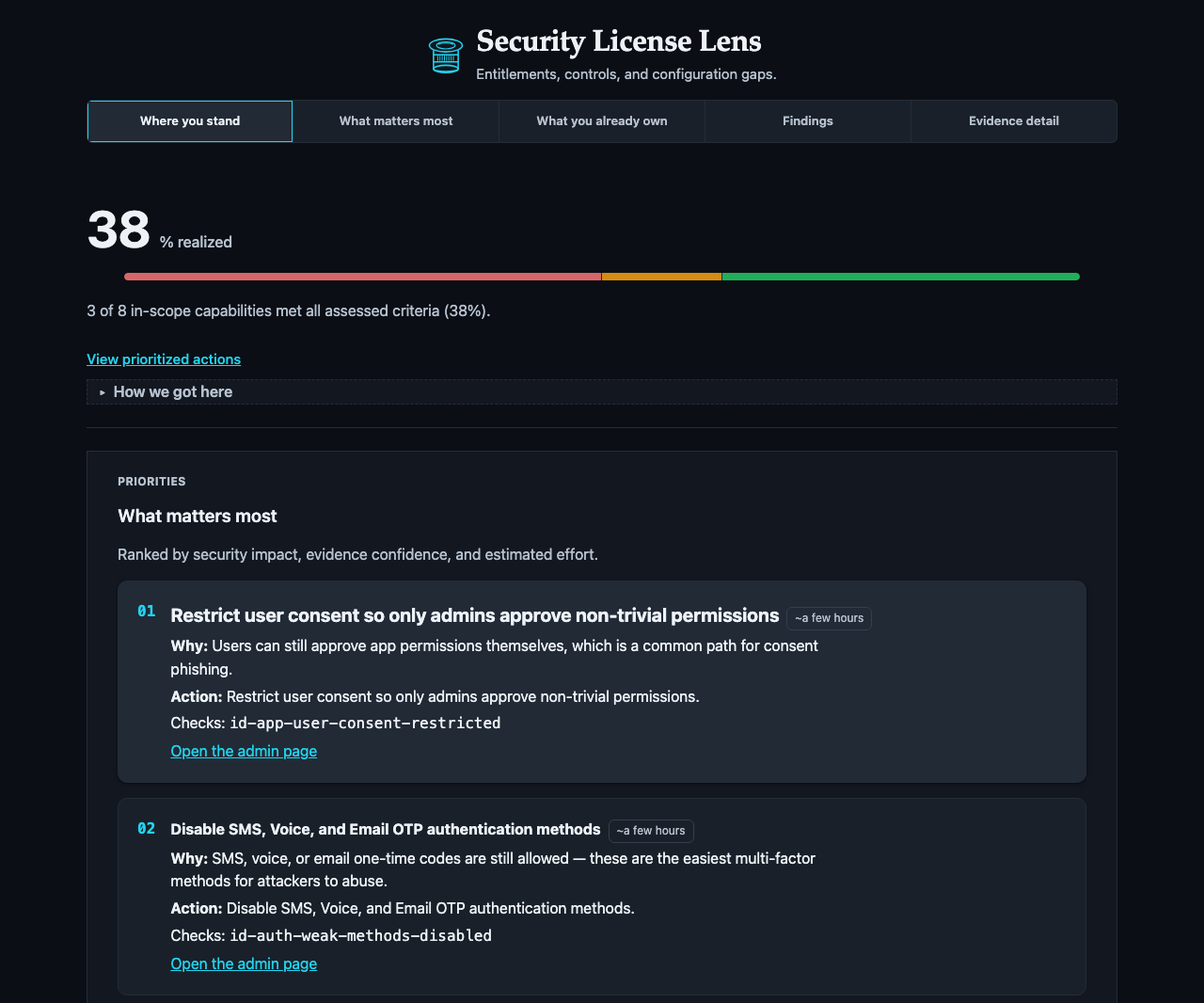
The dashboard: what you own, what's working, and what to fix first.
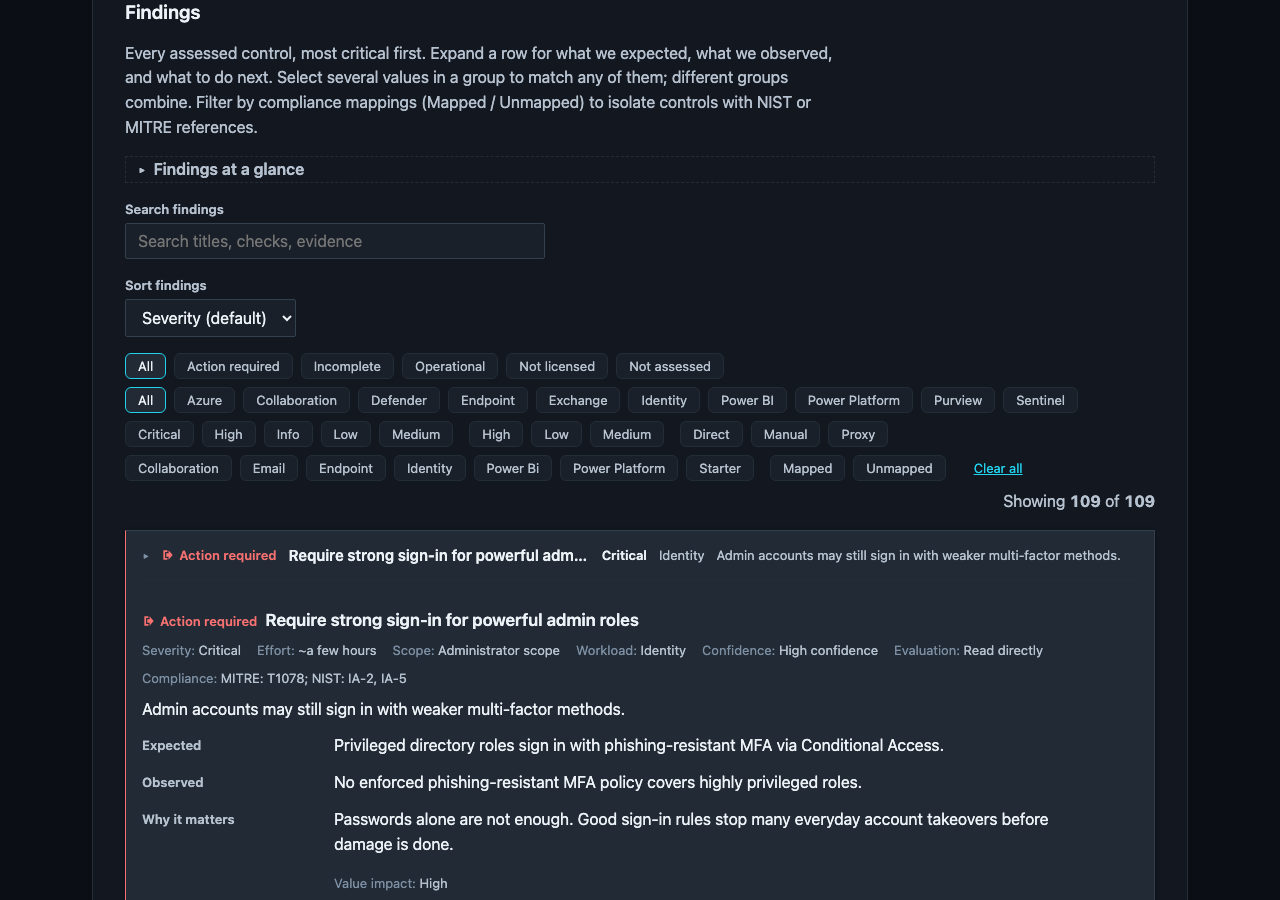
Every finding shows its evidence and a direct link to the admin page.

The same report at mobile width.
A concrete example
The most common finding, id-ca-priv-gaps:
- You pay for Microsoft 365 E5, so Conditional Access is licensed for every user.
- We expect MFA and legacy-auth blocking enforced through a CA policy.
- We observed zero Conditional Access policies → the report marks the tenant
EXPOSED. - Do this → enable an MFA CA policy (a few hours of work). The gap closes on the next scan.
Why Security License Lens?
| Tool | Optimizes for |
|---|---|
| ScubaGear | CISA baseline compliance |
| Maester | Continuous config tests (Pester) |
| Microsoft Secure Score | Score + recommendations (not SKU-gated) |
| License waste scripts | Seat assignment efficiency |
| Security License Lens | Owned SKUs → expected high-value controls → unused/default gaps |
See the documentation site for the full tool comparison.
Diff, discovery, and batch
# Compare two scan JSON artifacts by check_id
licenselens diff reports/before.json reports/after.json -o reports/diff.md

# Discover Sentinel-capable workspaces (prints ARM resource IDs)
licenselens discover-workspace --auth client_secret

# Multi-tenant scans from tenants.yaml (per-tenant reports + index.md)
licenselens batch tenants.yaml -o reports
Full check pack (v0.4.0)
170 checks · 31 capabilities · 11 profiles · 135 pinned SCuBA coverage rows (131 mapped) · package/sample 0.4.0
Checks run as direct, proxy, manual (you confirm), or dynamic
(direct first, Secure Score only if direct is missing). The report still records
whether a dynamic check ended up direct or proxy.
The authoritative pack lives in the generated reference (do not maintain a partial public table here):
- Check reference — collector, support state, evaluator, capabilities, evidence keys
- Capabilities · Profiles · Permissions · Coverage
- Machine-readable: reference/reference.json · manifest.json
Unlicensed capabilities report not_licensed instead of false gaps.
Known limitations
See limitations.md for the full list. Short version:
- Email pack off by default — no Graph API for MDO policy config (PowerShell-only);
--allow-email-proxyis opt-in and labeled (dynamic / Secure Score path) - Some surfaces are manual (operator-confirmed) or proxy (Secure Score); see the check reference for per-check state
- Sentinel / Log Analytics / Defender for Cloud need a workspace ARM ID + Azure RBAC; without an Azure scope (or on a denied read) those checks report
error(entitlement undetermined), never a false not-licensed - Sign-in / MDE inventories may truncate on huge tenants
- Findings are advisory, not a compliance certification
- No product telemetry by default
Architecture
SKUs / service plans → capability catalog → eligible checks
        → collectors (Graph / MDE / ARM) → findings → HTML / JSON / Markdown
Permissions
See permissions.md and app-registration.md.
Exit codes
| Code | Meaning |
|---|---|
| 0 | Success (no gap/partial findings) |
| 1 | Completed with gap or partial findings |
| 2 | Auth / configuration / API error |
Contributing
See contributing.md and adding-a-check.md.
Security
security.md — read-only, no telemetry by default.
License
Disclaimer
Security License Lens is an independent open-source project and is not affiliated with, endorsed by, or sponsored by Microsoft Corporation. Findings are advisory. “Microsoft”, “Entra”, “Defender”, “Sentinel”, and “Purview” are trademarks of their respective owners.